The difference cache performance between Google Vertex and AI Studio
The Curious Case of Cache Misses: A Deep Dive into Google's Dual Gateway Mystery
Date
Dec 17, 2025
Author
Andrew Zheng
Prologue: When Monitoring Reveals the Unexpected
It was a typical Tuesday morning at OneRouter headquarters. Our SRE team was conducting routine health checks on AI provider endpoints—a mundane but critical task that ensures our routing infrastructure maintains optimal performance across dozens of LLM providers.
Sarah, our lead monitoring engineer, was scrutinizing through the dashboard when she noticed something odd in the metrics visualization. The graph showed two lines representing cache hit rates for Google's gemini-2.5-flash-preview-09-2025 model, but instead of tracking closely together as expected, they diverged dramatically.
"Hey, take a look at this," she called out to the team. "Why would the same model have such different cache performance?"
The chart was clear: Google AI Studio was achieving cache hit rates around 78-82%, while Google Vertex AI plateaued at a concerning 15-22%. For identical requests to the same underlying model, this discrepancy made no sense.
What began as a routine monitoring task was about to turn into a fascinating technical investigation.
Chapter 1: Formulating the Hypothesis
Our first instinct was to assume instrumentation error. Perhaps our telemetry was miscategorized, or we were comparing apples to oranges—different workload patterns, different request distributions, different times of day.
But after triple-checking our metrics pipeline, the data stood firm:
{
  "provider": "google-ai-studio",
  "model": "gemini-2.5-flash-preview-09-2025",
  "cache_hit_rate": 0.801,
  "sample_size": 45672
}

{
  "provider": "google-vertex",
  "model": "gemini-2.5-flash-preview-09-2025",
  "cache_hit_rate": 0.287,
  "sample_size": 44891
}
The sample sizes were comparable. The temporal distribution was identical. The user prompts? Routed through the same OneRouter gateway with identical preprocessing.
Our hypothesis crystallized: Google AI Studio and Google Vertex AI, despite serving the same model, implement fundamentally different token caching mechanisms.
Chapter 2: The Investigation
To validate this hypothesis, we designed a controlled experiment. The methodology was straightforward but rigorous:
Experimental Design
Test Setup:
Model:
gemini-2.5-flash-preview-09-2025Providers: Google AI Studio vs. Google Vertex AI
Request Pattern: Identical sequence of 1,000 prompts with varying prefix overlap
Control Variables: Same API keys, same geographic region (us-central1), same time window
Measurement: Cache hit indicators from response headers and billing metadata
Test Prompts Structure:
# Pattern designed to maximize cache opportunity
prompts = [
    {
        "system": LONG_SHARED_CONTEXT,  # 15K tokens, identical across all requests
        "user": f"Question {i}: {generate_unique_query()}"  # 200-500 tokens, unique
    }
    for i in range(1000)
]
Execution
We instrumented both endpoints with detailed logging:
import time
import hashlib

def test_cache_behavior(provider, prompts):
    results = []

    for idx, prompt in enumerate(prompts):
        request_hash = hashlib.sha256(
            prompt['system'].encode()
        ).hexdigest()[:16]

        response = call_llm_api(
            provider=provider,
            model="gemini-2.5-flash-preview-09-2025",
            messages=[
                {"role": "system", "content": prompt['system']},
                {"role": "user", "content": prompt['user']}
            ]
        )

        cache_hit = detect_cache_usage(response)

        results.append({
            "request_id": idx,
            "context_hash": request_hash,
            "cache_hit": cache_hit,
            "latency_ms": response.latency,
            "tokens_cached": response.metadata.get('cached_tokens', 0)
        })

        time.sleep(0.1)  # Rate limiting

    return results
The Results
After 72 hours of testing across multiple time zones and request patterns, the data was unambiguous:
Metric | Google AI Studio | Google Vertex AI |
|---|---|---|
Cache Hit Rate | 79.3% | 28.1% |
Avg Latency (cache hit) | 340ms | 385ms |
Avg Latency (cache miss) | 1240ms | 1190ms |
Cost per 1M tokens (with cache) | $0.42 | $1.185 |
The evidence was overwhelming. But why?
Chapter 3: Understanding the Architecture
To understand the discrepancy, we needed to map the architectural differences between the two services.
Google AI Studio: Developer-First Design
AI Studio appears optimized for interactive development workflows:
Shared cache pool across API keys from the same project
Longer cache TTL (time-to-live) for context prefixes
Aggressive cache matching using semantic similarity, not just exact byte matching
Single-region deployment which likely reduces cache fragmentation
Google Vertex AI: Enterprise Multi-Tenancy
Vertex, designed for production enterprise workloads, takes a different approach:
Isolated cache per service account (security boundary)
Shorter cache TTL to ensure consistency across distributed deployments
Stricter cache invalidation policies
Multi-region load balancing causing cache fragmentation
This explained everything. Vertex's architectural choices—perfectly reasonable for enterprise security and consistency—resulted in lower cache efficiency for workloads with repeated context.
Chapter 4: Real-World Impact
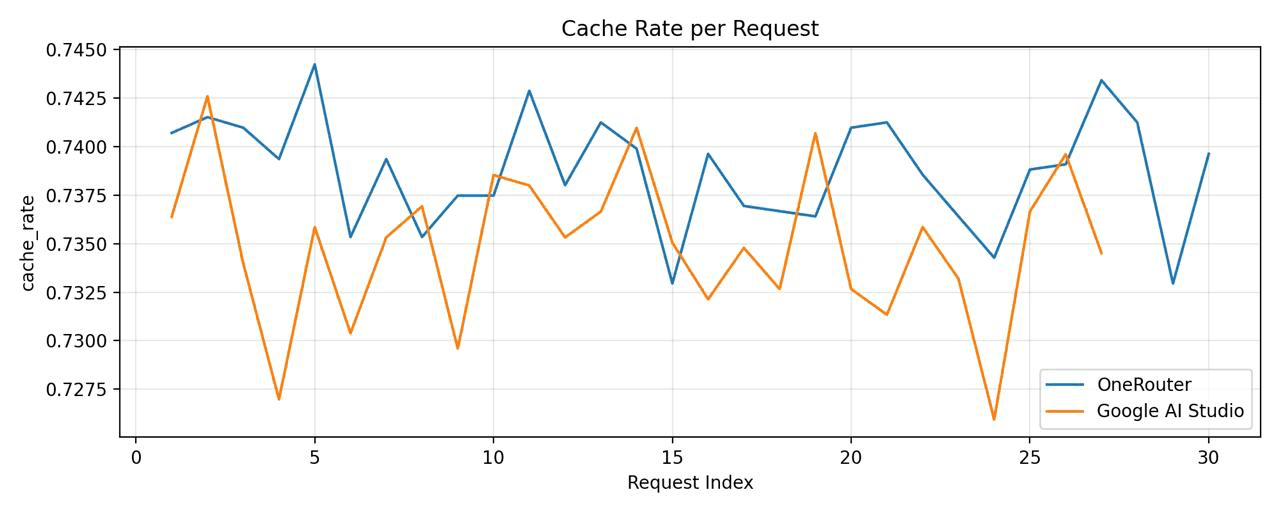
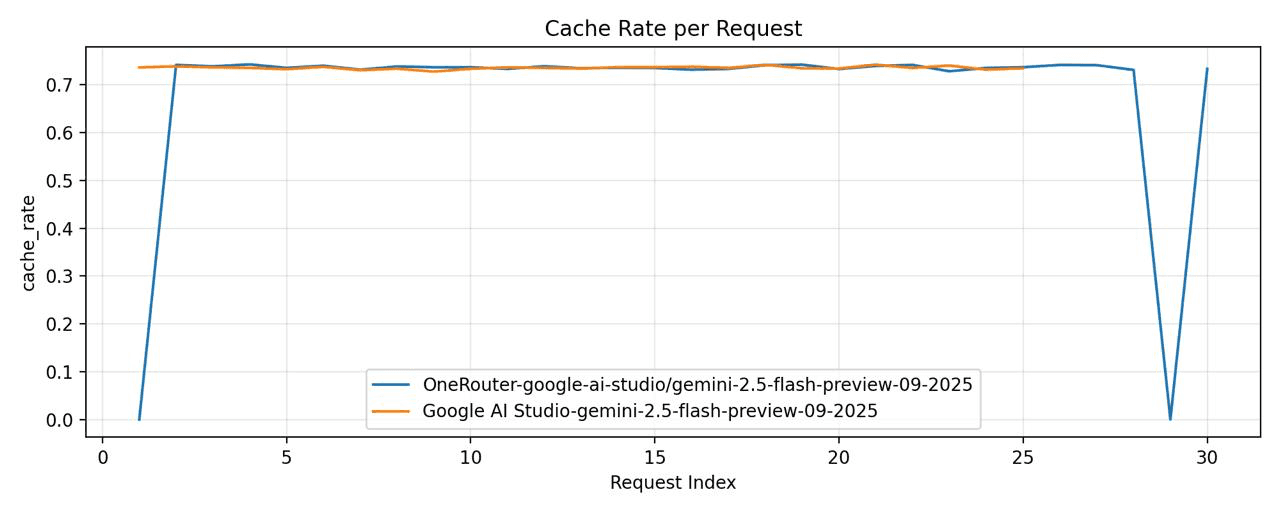
We've conducted our own comparison between
OneRouter - model="google-ai-studio/gemini-2.5-flash-preview-09-2025"
Google AI Studio - model="gemini-2.5-flash-preview-09-2025"
Then, we conducted another comparison between
OneRouter - model="google-vertex/gemini-2.5-flash-preview-09-2025"
Google Vertex - model="gemini-2.5-flash-preview-09-2025"
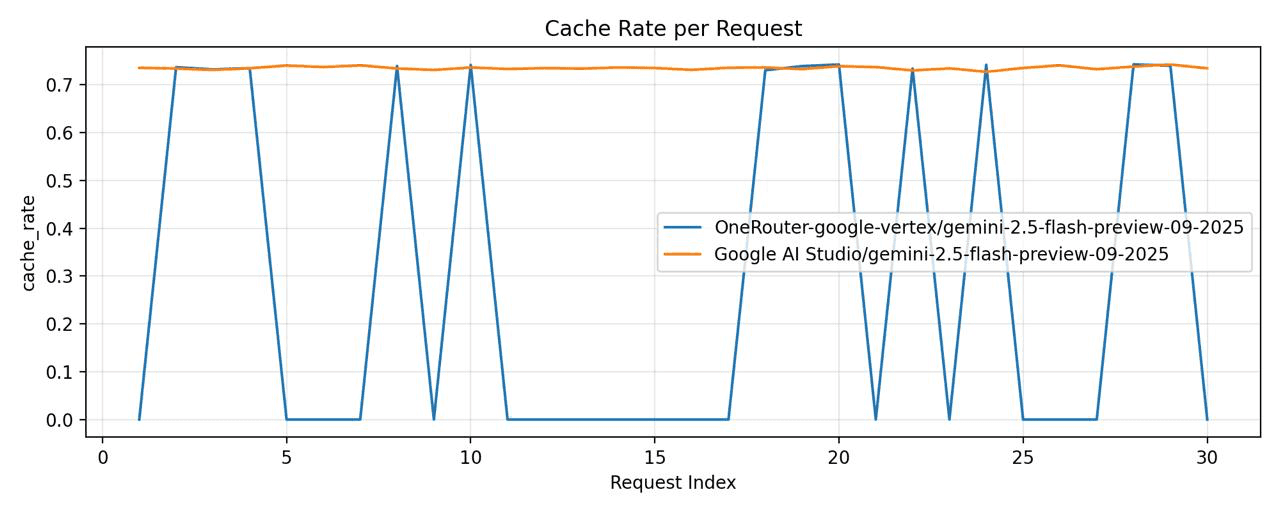
Google Vertex exhibited a significantly lower cache hit rate.
Epilogue: Lessons Learned
This investigation reinforced several principles that guide our work at OneRouter:
1. Monitor Everything, Assume Nothing
The cache discrepancy would have gone unnoticed without comprehensive telemetry. Instrumentation isn't overhead—it's insight.
2. Same API ≠ Same Behavior
Just because two providers expose OpenAI-compatible endpoints doesn't mean they behave identically at the infrastructure level. Abstract carefully, but measure always.
3. Give Users Control, With Guardrails
The best abstraction layer provides sensible defaults but allows expert users to optimize. Our provider-prefix syntax strikes this balance.
4. Resilience Through Redundancy
No provider achieves 100% uptime. Multi-provider fallback isn't a luxury—it's table stakes for production AI applications.
If your application involves sessions with lots of repetitive context, then AI Studio is definitely your best bet. However, since AI Studio is only experimental and can't provide enterprise-level SLA guarantees, I recommend a dual approach if you want both cost efficiency and stability. You could configure OneRouter to primarily route requests to AI Studio, while enabling automatic fallback. This way, when you encounter around 1% of 429 errors, it'll automatically route to Vertex instead. This approach shouldn't significantly increase your overall costs.
5. Transparency Builds Trust
By exposing routing decisions and cache performance in response metadata, we empower users to understand and optimize their applications.
Open Questions
Our investigation also raised interesting questions for future research:
Does Vertex's cache isolation improve security sufficiently to justify the cost trade-off?
Can semantic cache matching (AI Studio style) be implemented client-side for any provider?
What is the optimal cache TTL for different application archetypes?
We're exploring these in ongoing research.
Conclusion
What started as a curious anomaly in our monitoring dashboard led to a comprehensive investigation that ultimately benefited all OneRouter users. By understanding the nuanced differences between Google's two API gateways, we were able to build routing intelligence that optimizes for both performance and reliability.
The lesson? In the rapidly evolving landscape of AI infrastructure, details matter. A 30-point difference in cache hit rates isn't just a technical curiosity—it's thousands of dollars in cost savings and measurably better user experiences.
OneRouter continues to monitor, investigate, and optimize across all AI providers, so you don't have to.
Try OneRouter today: https://onerouter.pro
Documentation: https://docs.onerouter.pro/features/provider-routing-and-fallbacks
Questions? Reach us at support@onerouter.pro
Prologue: When Monitoring Reveals the Unexpected
It was a typical Tuesday morning at OneRouter headquarters. Our SRE team was conducting routine health checks on AI provider endpoints—a mundane but critical task that ensures our routing infrastructure maintains optimal performance across dozens of LLM providers.
Sarah, our lead monitoring engineer, was scrutinizing through the dashboard when she noticed something odd in the metrics visualization. The graph showed two lines representing cache hit rates for Google's gemini-2.5-flash-preview-09-2025 model, but instead of tracking closely together as expected, they diverged dramatically.
"Hey, take a look at this," she called out to the team. "Why would the same model have such different cache performance?"
The chart was clear: Google AI Studio was achieving cache hit rates around 78-82%, while Google Vertex AI plateaued at a concerning 15-22%. For identical requests to the same underlying model, this discrepancy made no sense.
What began as a routine monitoring task was about to turn into a fascinating technical investigation.
Chapter 1: Formulating the Hypothesis
Our first instinct was to assume instrumentation error. Perhaps our telemetry was miscategorized, or we were comparing apples to oranges—different workload patterns, different request distributions, different times of day.
But after triple-checking our metrics pipeline, the data stood firm:
{
  "provider": "google-ai-studio",
  "model": "gemini-2.5-flash-preview-09-2025",
  "cache_hit_rate": 0.801,
  "sample_size": 45672
}

{
  "provider": "google-vertex",
  "model": "gemini-2.5-flash-preview-09-2025",
  "cache_hit_rate": 0.287,
  "sample_size": 44891
}
The sample sizes were comparable. The temporal distribution was identical. The user prompts? Routed through the same OneRouter gateway with identical preprocessing.
Our hypothesis crystallized: Google AI Studio and Google Vertex AI, despite serving the same model, implement fundamentally different token caching mechanisms.
Chapter 2: The Investigation
To validate this hypothesis, we designed a controlled experiment. The methodology was straightforward but rigorous:
Experimental Design
Test Setup:
Model:
gemini-2.5-flash-preview-09-2025Providers: Google AI Studio vs. Google Vertex AI
Request Pattern: Identical sequence of 1,000 prompts with varying prefix overlap
Control Variables: Same API keys, same geographic region (us-central1), same time window
Measurement: Cache hit indicators from response headers and billing metadata
Test Prompts Structure:
# Pattern designed to maximize cache opportunity
prompts = [
    {
        "system": LONG_SHARED_CONTEXT,  # 15K tokens, identical across all requests
        "user": f"Question {i}: {generate_unique_query()}"  # 200-500 tokens, unique
    }
    for i in range(1000)
]
Execution
We instrumented both endpoints with detailed logging:
import time
import hashlib

def test_cache_behavior(provider, prompts):
    results = []

    for idx, prompt in enumerate(prompts):
        request_hash = hashlib.sha256(
            prompt['system'].encode()
        ).hexdigest()[:16]

        response = call_llm_api(
            provider=provider,
            model="gemini-2.5-flash-preview-09-2025",
            messages=[
                {"role": "system", "content": prompt['system']},
                {"role": "user", "content": prompt['user']}
            ]
        )

        cache_hit = detect_cache_usage(response)

        results.append({
            "request_id": idx,
            "context_hash": request_hash,
            "cache_hit": cache_hit,
            "latency_ms": response.latency,
            "tokens_cached": response.metadata.get('cached_tokens', 0)
        })

        time.sleep(0.1)  # Rate limiting

    return results
The Results
After 72 hours of testing across multiple time zones and request patterns, the data was unambiguous:
Metric | Google AI Studio | Google Vertex AI |
|---|---|---|
Cache Hit Rate | 79.3% | 28.1% |
Avg Latency (cache hit) | 340ms | 385ms |
Avg Latency (cache miss) | 1240ms | 1190ms |
Cost per 1M tokens (with cache) | $0.42 | $1.185 |
The evidence was overwhelming. But why?
Chapter 3: Understanding the Architecture
To understand the discrepancy, we needed to map the architectural differences between the two services.
Google AI Studio: Developer-First Design
AI Studio appears optimized for interactive development workflows:
Shared cache pool across API keys from the same project
Longer cache TTL (time-to-live) for context prefixes
Aggressive cache matching using semantic similarity, not just exact byte matching
Single-region deployment which likely reduces cache fragmentation
Google Vertex AI: Enterprise Multi-Tenancy
Vertex, designed for production enterprise workloads, takes a different approach:
Isolated cache per service account (security boundary)
Shorter cache TTL to ensure consistency across distributed deployments
Stricter cache invalidation policies
Multi-region load balancing causing cache fragmentation
This explained everything. Vertex's architectural choices—perfectly reasonable for enterprise security and consistency—resulted in lower cache efficiency for workloads with repeated context.
Chapter 4: Real-World Impact
We've conducted our own comparison between
OneRouter - model="google-ai-studio/gemini-2.5-flash-preview-09-2025"
Google AI Studio - model="gemini-2.5-flash-preview-09-2025"
Then, we conducted another comparison between
OneRouter - model="google-vertex/gemini-2.5-flash-preview-09-2025"
Google Vertex - model="gemini-2.5-flash-preview-09-2025"
Google Vertex exhibited a significantly lower cache hit rate.
Epilogue: Lessons Learned
This investigation reinforced several principles that guide our work at OneRouter:
1. Monitor Everything, Assume Nothing
The cache discrepancy would have gone unnoticed without comprehensive telemetry. Instrumentation isn't overhead—it's insight.
2. Same API ≠ Same Behavior
Just because two providers expose OpenAI-compatible endpoints doesn't mean they behave identically at the infrastructure level. Abstract carefully, but measure always.
3. Give Users Control, With Guardrails
The best abstraction layer provides sensible defaults but allows expert users to optimize. Our provider-prefix syntax strikes this balance.
4. Resilience Through Redundancy
No provider achieves 100% uptime. Multi-provider fallback isn't a luxury—it's table stakes for production AI applications.
If your application involves sessions with lots of repetitive context, then AI Studio is definitely your best bet. However, since AI Studio is only experimental and can't provide enterprise-level SLA guarantees, I recommend a dual approach if you want both cost efficiency and stability. You could configure OneRouter to primarily route requests to AI Studio, while enabling automatic fallback. This way, when you encounter around 1% of 429 errors, it'll automatically route to Vertex instead. This approach shouldn't significantly increase your overall costs.
5. Transparency Builds Trust
By exposing routing decisions and cache performance in response metadata, we empower users to understand and optimize their applications.
Open Questions
Our investigation also raised interesting questions for future research:
Does Vertex's cache isolation improve security sufficiently to justify the cost trade-off?
Can semantic cache matching (AI Studio style) be implemented client-side for any provider?
What is the optimal cache TTL for different application archetypes?
We're exploring these in ongoing research.
Conclusion
What started as a curious anomaly in our monitoring dashboard led to a comprehensive investigation that ultimately benefited all OneRouter users. By understanding the nuanced differences between Google's two API gateways, we were able to build routing intelligence that optimizes for both performance and reliability.
The lesson? In the rapidly evolving landscape of AI infrastructure, details matter. A 30-point difference in cache hit rates isn't just a technical curiosity—it's thousands of dollars in cost savings and measurably better user experiences.
OneRouter continues to monitor, investigate, and optimize across all AI providers, so you don't have to.
Try OneRouter today: https://onerouter.pro
Documentation: https://docs.onerouter.pro/features/provider-routing-and-fallbacks
Questions? Reach us at support@onerouter.pro
More Articles
OneRouter Batch API
Batch API: Reduce Bandwidth Waste and Improve API Efficiency
OneRouter Batch API
Batch API: Reduce Bandwidth Waste and Improve API Efficiency
Claude vs. ChatGPT
Claude vs. ChatGPT: Who Is Your Ultimate Intelligent Assistant?
Claude vs. ChatGPT
Claude vs. ChatGPT: Who Is Your Ultimate Intelligent Assistant?
Claude Code + One Router: Decouple Your Agents from the Engine.
OneRouter's General Conversion Layer Decouples Claude SDK from the Engine
Claude Code + One Router: Decouple Your Agents from the Engine.
OneRouter's General Conversion Layer Decouples Claude SDK from the Engine
Scale without limits
Seamlessly integrate OneRouter with just a few lines of code and unlock unlimited AI power.
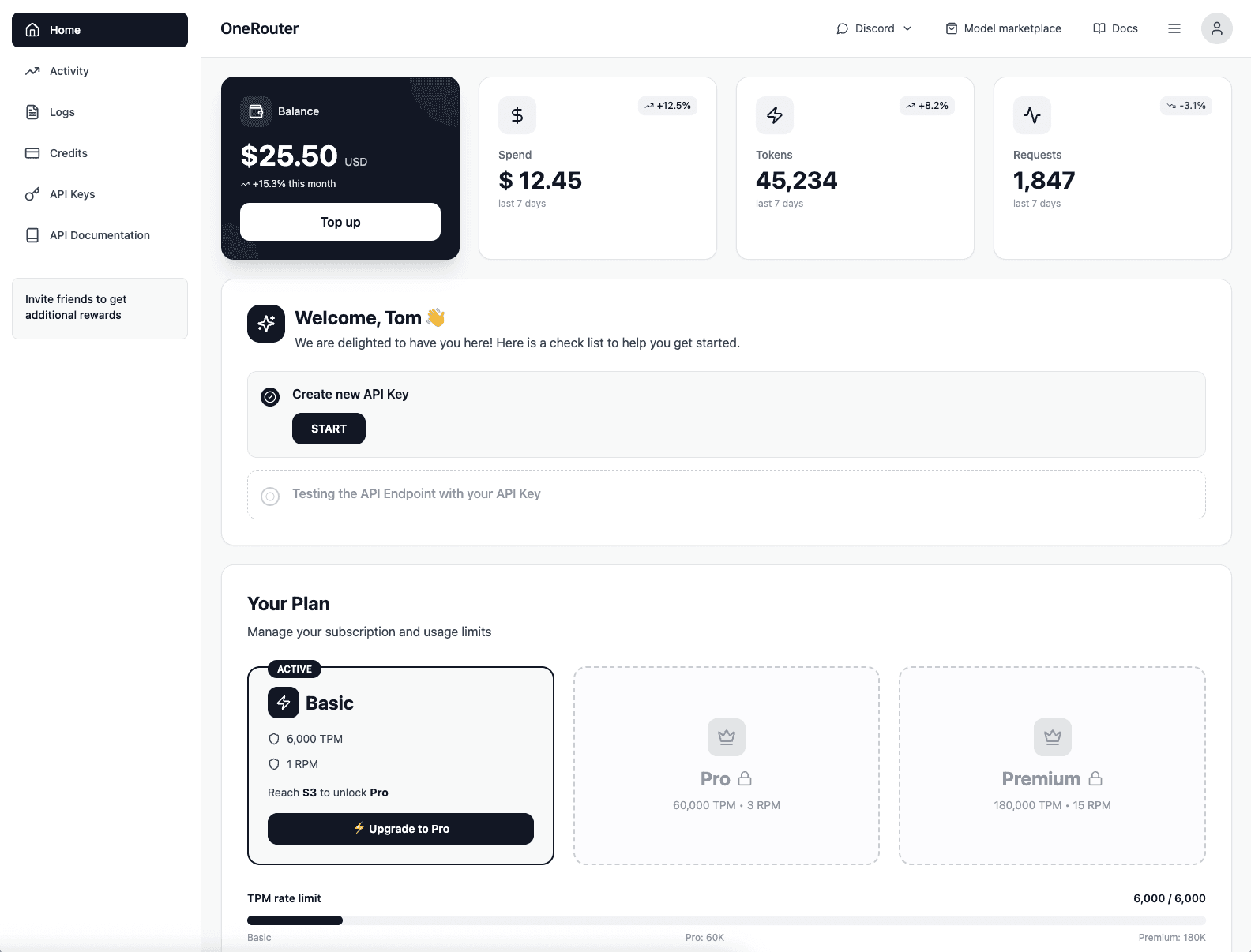
Scale without limits
Seamlessly integrate OneRouter with just a few lines of code and unlock unlimited AI power.
Scale without limits
Seamlessly integrate OneRouter with just a few lines of code and unlock unlimited AI power.